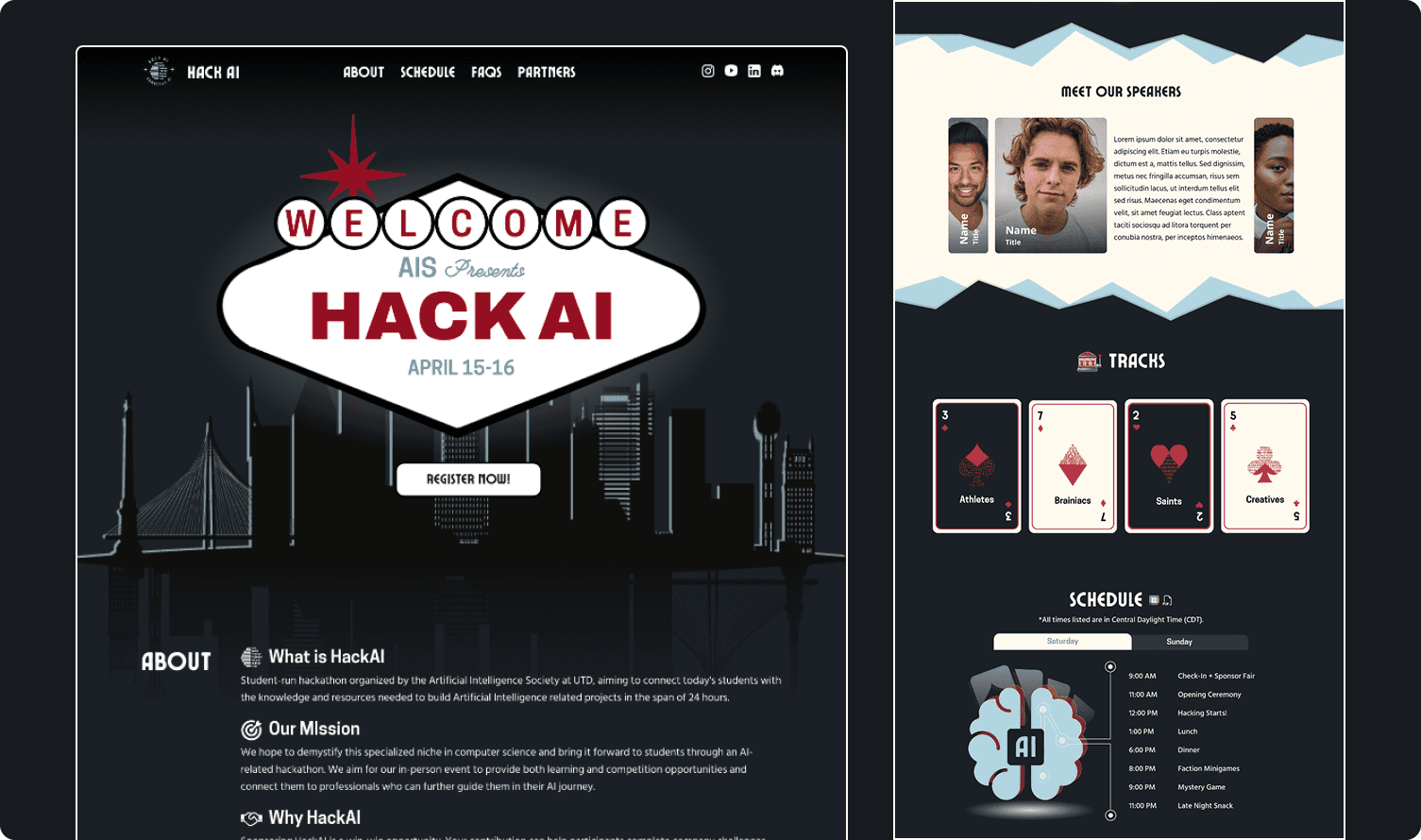
HackAI'23

HackAI'23

HackAI'23

Designing for Clarity, Excitement, and Higher Participation

Designing for Clarity, Excitement, and Higher Participation

Designing for Clarity, Excitement, and Higher Participation

Project Brief

timeline

4 weeks

ROLE

UI/UX designer, Visual designer

TEAM

1 Designer + 4 Developers

tools

Figma, Adobe Illustrator

Overview

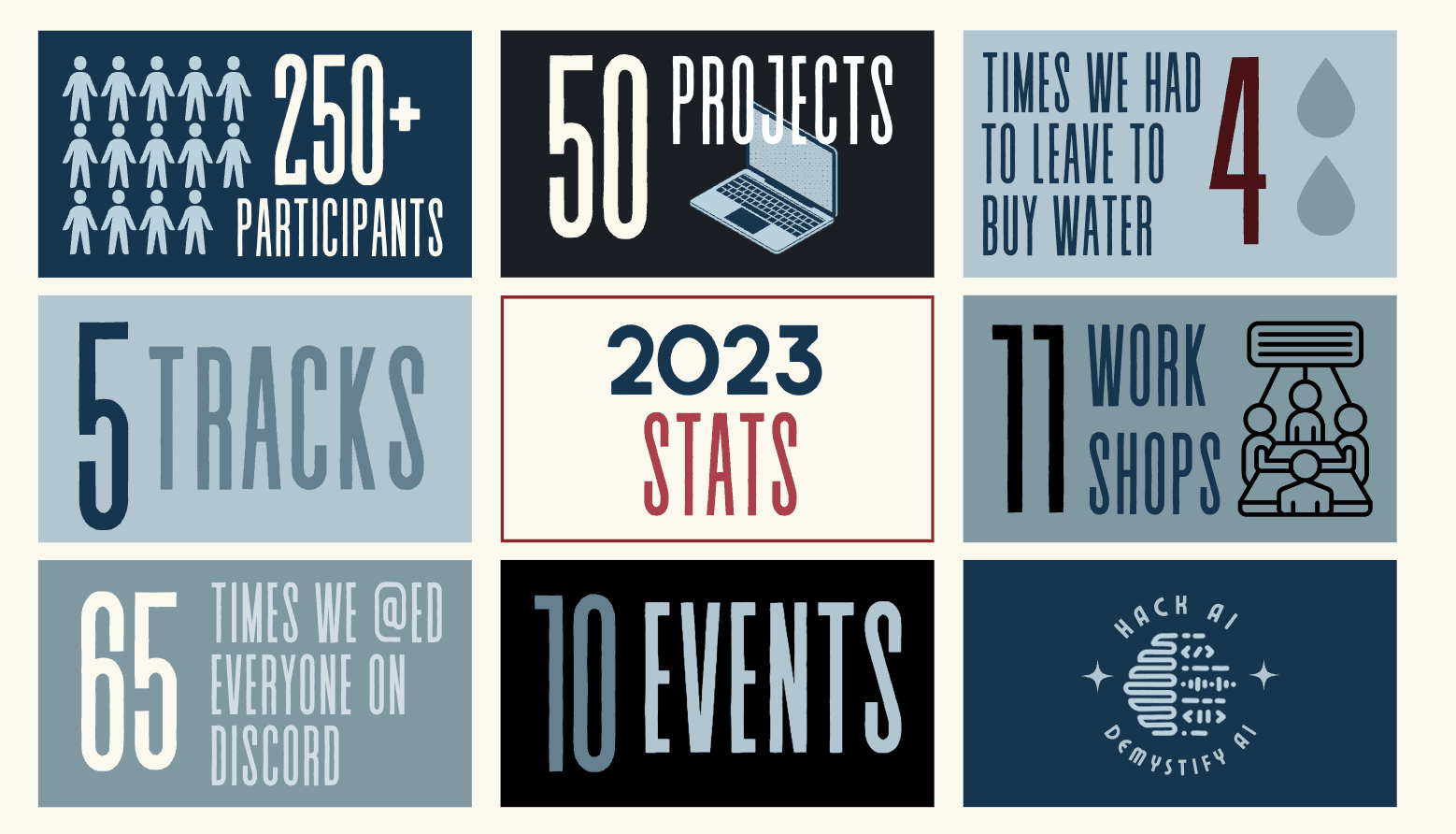
HackAI is AIS's flagship 24-hour hackathon bringing together 250+ students, sponsors, and tech leaders. Despite the event's scale, the previous website felt generic and failed to communicate why students should participate.

Through user research with 10 students and firsthand immersion at WeHack 2023, I identified three critical needs: immediate clarity, seamless sign-up, and trust-building design. The solution? A bold casino-themed redesign that drove a 262% increase in participation and established a visual foundation for future events.

Impact at a Glance

262%

Increase in event participation from previous year

262%

Increase in event participation from previous year

262%

Increase in event participation from previous year

4.8/5

Navigation satisfaction score from users

4.8/5

Navigation satisfaction score from users

4.8/5

Navigation satisfaction score from users

<10 sec

100% of test users found key info in under 10 seconds

<10 sec

100% of test users found key info in under 10 seconds

<10 sec

100% of test users found key info in under 10 seconds

THE CHALLENGE

How might we make HackAI feel as ambitious as it actually is?

The old website was generic and minimal—giving the impression of a small, unestablished event. Students couldn't answer "Why should I join?" and the design didn't build credibility or excitement. We needed to transform the online presence to match the event's scale while making information instantly accessible and registration frictionless.

THE CHALLENGE

How might we make HackAI feel as ambitious as it actually is?

The old website was generic and minimal—giving the impression of a small, unestablished event. Students couldn't answer "Why should I join?" and the design didn't build credibility or excitement. We needed to transform the online presence to match the event's scale while making information instantly accessible and registration frictionless.

THE CHALLENGE

How might we make HackAI feel as ambitious as it actually is?

The old website was generic and minimal—giving the impression of a small, unestablished event. Students couldn't answer "Why should I join?" and the design didn't build credibility or excitement. We needed to transform the online presence to match the event's scale while making information instantly accessible and registration frictionless.

User research

User research

User research

Understanding the User: Research & Discovery

the problem

the problem

the problem

HackAI Needed to Look as Ambitious as Its Vision

HackAI is AIS's flagship event—a 24-hour AI-themed hackathon that brings together students, sponsors, and industry leaders. Despite the scale and prestige of the event, the previous website didn't reflect this.

Generic & Minimal

The old site felt like a small, unestablished event. No visual identity, no energy, no personality.

Generic & Minimal

The old site felt like a small, unestablished event. No visual identity, no energy, no personality.

Generic & Minimal

The old site felt like a small, unestablished event. No visual identity, no energy, no personality.

Unclear Value

Students couldn't answer "Why should I join?" Information was buried, logistics unclear.

Unclear Value

Students couldn't answer "Why should I join?" Information was buried, logistics unclear.

Unclear Value

Students couldn't answer "Why should I join?" Information was buried, logistics unclear.

Low Credibility

Design didn't communicate the event's scale, sponsors, or prestige. Felt amateur compared to other hackathons.

Low Credibility

Design didn't communicate the event's scale, sponsors, or prestige. Felt amateur compared to other hackathons.

Low Credibility

Design didn't communicate the event's scale, sponsors, or prestige. Felt amateur compared to other hackathons.

No Excitement

Nothing about the site built anticipation or reflected the intense, competitive hackathon experience.

No Excitement

Nothing about the site built anticipation or reflected the intense, competitive hackathon experience.

No Excitement

Nothing about the site built anticipation or reflected the intense, competitive hackathon experience.

the challenge

Create a website that builds credibility, excitement, and trust instantly

How might we transform HackAI's online presence to match the ambition of the event itself—building credibility, excitement, and trust while making information instantly accessible?

the challenge

Create a website that builds credibility, excitement, and trust instantly

How might we transform HackAI's online presence to match the ambition of the event itself—building credibility, excitement, and trust while making information instantly accessible?

the challenge

Create a website that builds credibility, excitement, and trust instantly

How might we transform HackAI's online presence to match the ambition of the event itself—building credibility, excitement, and trust while making information instantly accessible?

USER RESEARCH

USER RESEARCH

USER RESEARCH

Real Voices, Real Frustrations

User interviews with 10 students (first-timers and veterans) revealed what makes or breaks a hackathon website experience.

User interviews with 10 students (first-timers and veterans) revealed what makes or breaks a hackathon website experience.

User interviews with 10 students (first-timers and veterans) revealed what makes or breaks a hackathon website experience.

1

Immediate Clarity

Users wanted to feel the theme and find answers fast. No hunting for basic info.

1

Immediate Clarity

Users wanted to feel the theme and find answers fast. No hunting for basic info.

1

Immediate Clarity

Users wanted to feel the theme and find answers fast. No hunting for basic info.

2

Seamless Sign-Up

Friction at registration led to drop-off. Every extra click was a potential lost participant.

2

Seamless Sign-Up

Friction at registration led to drop-off. Every extra click was a potential lost participant.

2

Seamless Sign-Up

Friction at registration led to drop-off. Every extra click was a potential lost participant.

3

Trust-Building Design

First impressions had to deliver excitement + ease. Students judge events by their websites.

3

Trust-Building Design

First impressions had to deliver excitement + ease. Students judge events by their websites.

3

Trust-Building Design

First impressions had to deliver excitement + ease. Students judge events by their websites.

What Students Told Us

"First impressions matter—users want to feel the theme and energy immediately."

"First impressions matter—users want to feel the theme and energy immediately."

"First impressions matter—users want to feel the theme and energy immediately."

Frictionless registration increases the chance they'll sign up.

Frictionless registration increases the chance they'll sign up.

Frictionless registration increases the chance they'll sign up.

"Users need answers to logistical questions (FAQ, eligibility, location)."

"Users need answers to logistical questions (FAQ, eligibility, location)."

"Users need answers to logistical questions (FAQ, eligibility, location)."

"The website should reflect the experience and build anticipation."

"The website should reflect the experience and build anticipation."

"The website should reflect the experience and build anticipation."

"Event info should be instantly accessible."

"Event info should be instantly accessible."

"Event info should be instantly accessible."

user persona

user persona

user persona

Different Backgrounds,
Same Mission

Different Backgrounds,
Same Mission

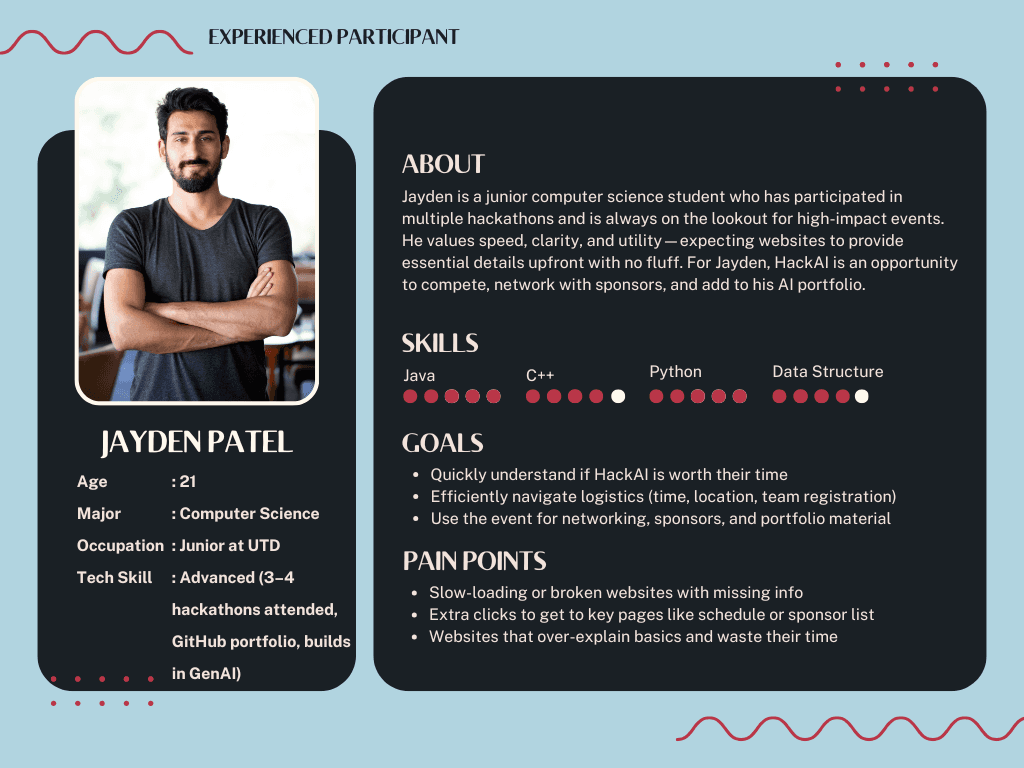
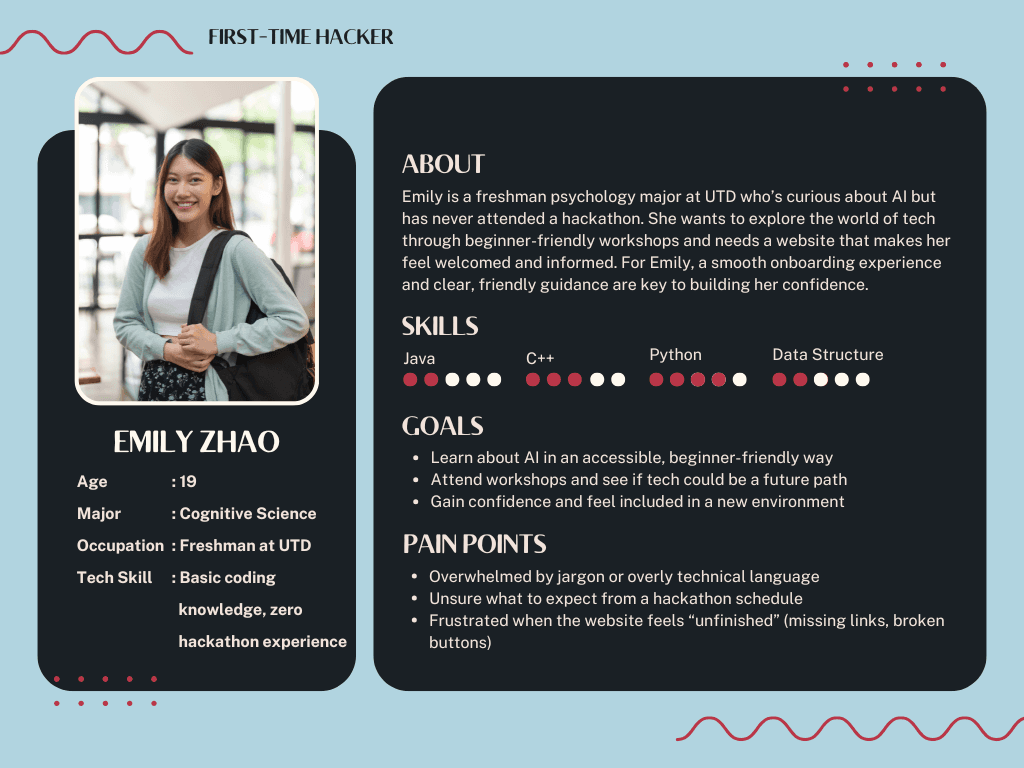
The first-time hacker: Needs encouragement, clarity, and onboarding

The seasoned coder: Wants speed, structure, and answers

Their needs shaped our homepage, navigation, and tone.
user immersion

user immersion

user immersion

Empathy in Action: I Became the User

To understand the hackathon experience from the inside, I joined WeHack 2023—my first hackathon. Immersing myself in the event let me spot friction points and emotional highs that I brought back to HackAI.

Our team's design even won 1st place—proof that understanding the user experience deeply leads to better design outcomes.

define

define

define

From Research to Design Principles

The user research revealed clear patterns. Students needed more than just information—they needed an experience that felt trustworthy, exciting, and effortless from the first click. These insights became the foundation for every design decision.

1

Build Trust Instantly

First impressions determine whether students register. The design must communicate credibility and scale immediately.

1

Build Trust Instantly

First impressions determine whether students register. The design must communicate credibility and scale immediately.

1

Build Trust Instantly

First impressions determine whether students register. The design must communicate credibility and scale immediately.

2

Create Anticipation

The website should feel as exciting as the event itself. Theme and energy need to come through before users even scroll.

2

Create Anticipation

The website should feel as exciting as the event itself. Theme and energy need to come through before users even scroll.

2

Create Anticipation

The website should feel as exciting as the event itself. Theme and energy need to come through before users even scroll.

3

Remove All Friction

Every unnecessary click is a lost participant. Information must be instantly accessible, and registration seamless.

3

Remove All Friction

Every unnecessary click is a lost participant. Information must be instantly accessible, and registration seamless.

3

Remove All Friction

Every unnecessary click is a lost participant. Information must be instantly accessible, and registration seamless.

How Might We...

→ Design a visual identity that immediately communicates the scale and prestige of HackAI?

→ Make event details (schedule, tracks, FAQs) instantly accessible without overwhelming users?

→ Create a registration flow so frictionless that students sign up on impulse?

→ Build anticipation and excitement that matches the actual hackathon experience?

How Might We...

→ Design a visual identity that immediately communicates the scale and prestige of HackAI?

→ Make event details (schedule, tracks, FAQs) instantly accessible without overwhelming users?

→ Create a registration flow so frictionless that students sign up on impulse?

→ Build anticipation and excitement that matches the actual hackathon experience?

How Might We...

→ Design a visual identity that immediately communicates the scale and prestige of HackAI?

→ Make event details (schedule, tracks, FAQs) instantly accessible without overwhelming users?

→ Create a registration flow so frictionless that students sign up on impulse?

→ Build anticipation and excitement that matches the actual hackathon experience?

COMPETITIVE ANALYSIS

COMPETITIVE ANALYSIS

COMPETITIVE ANALYSIS

What Great Hackathons Get Right (and Wrong)

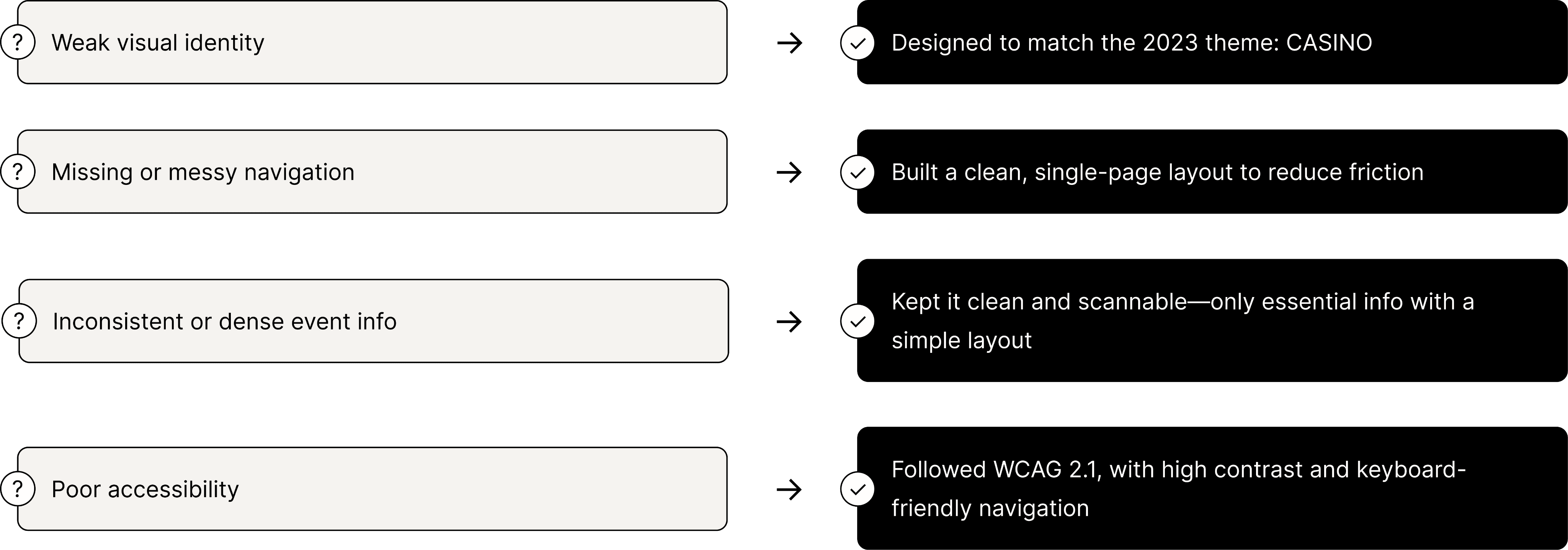
I reviewed 9 top hackathon sites, rating them on four UX factors: design, navigation, event clarity, and accessibility. This analysis revealed patterns in what works—and what frustrates users.
IDEATION & WIREFRAMING

IDEATION & WIREFRAMING

IDEATION & WIREFRAMING

User Journey & Wireframes

Close-up Storyboard:
Emily, the First-Time Hacker, Signing Up for HackAI
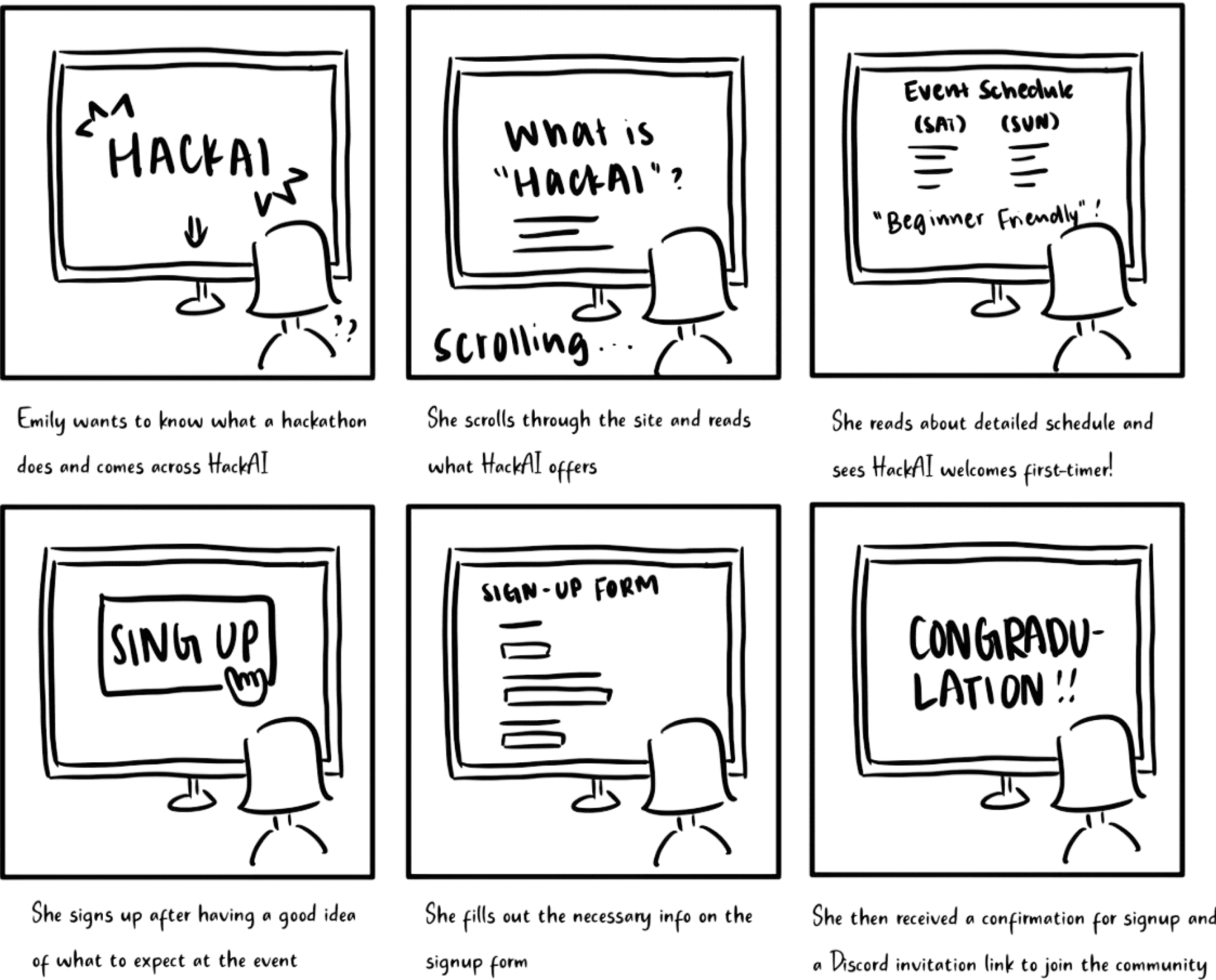
Sketching the Vision

Our process started with low-fidelity wireframes focused on the registration flow, schedule access, and mobile-first layout. The key decision: a single-page structure to minimize navigation friction.
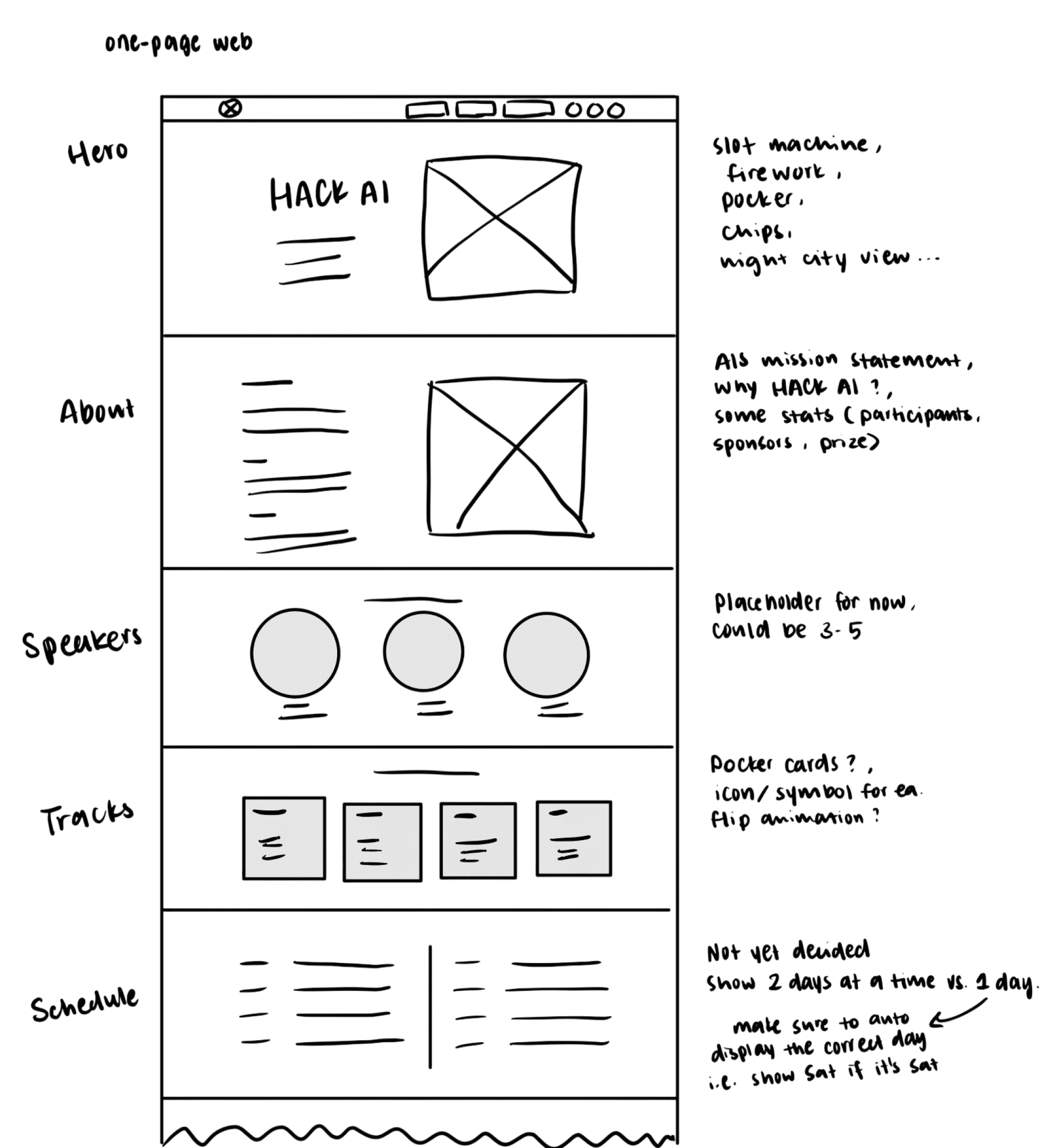
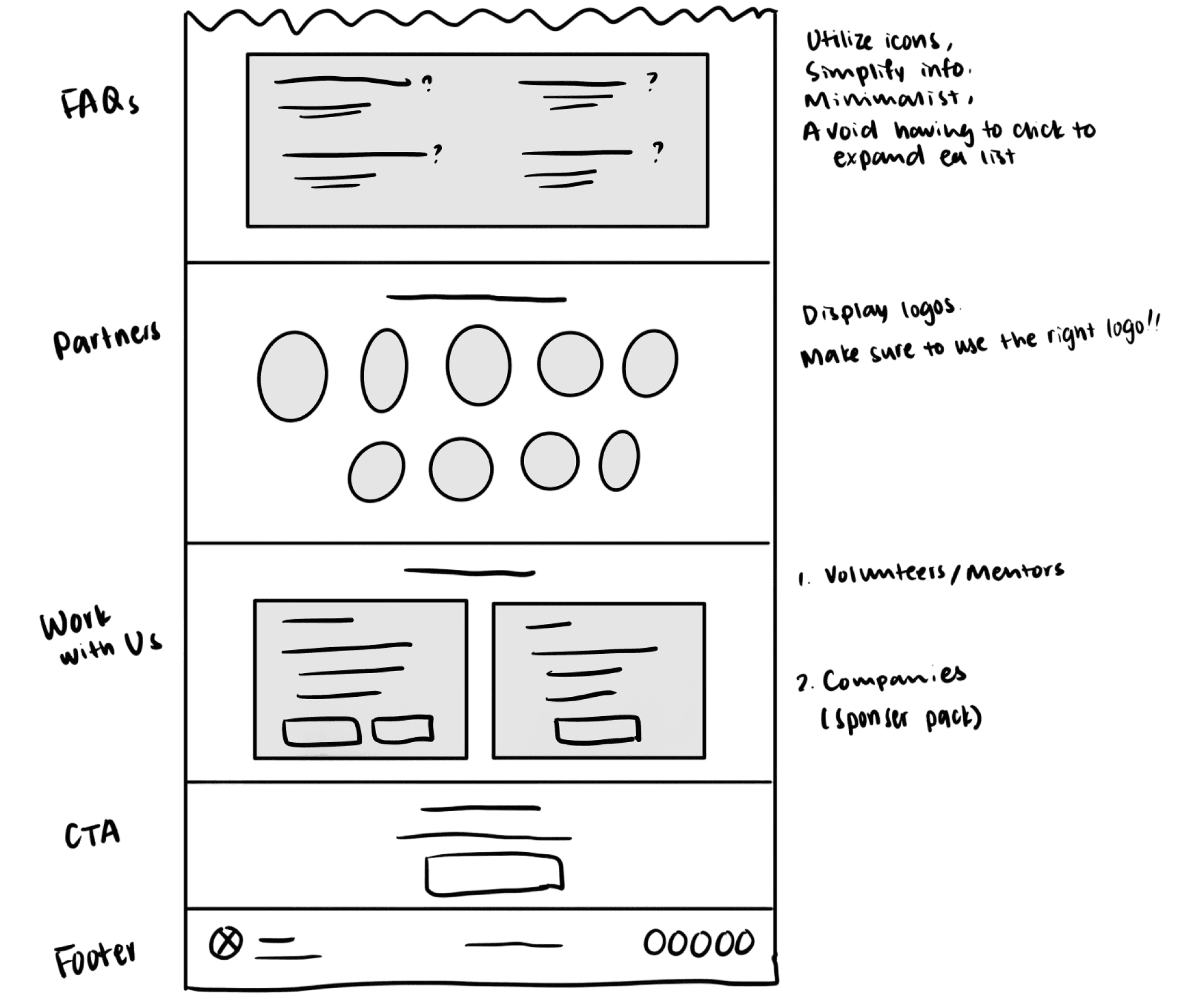
Strategic Wireframe Decisions

📱

Single-Page Layout

Eliminated navigation friction by putting everything on one scrollable page—matching user expectations for event sites.

📱

Single-Page Layout

Eliminated navigation friction by putting everything on one scrollable page—matching user expectations for event sites.

📱

Single-Page Layout

Eliminated navigation friction by putting everything on one scrollable page—matching user expectations for event sites.

🎴

Card-Based Tracks

Designed tracks as poker cards (matching casino theme) for instant scannability and visual interest.

🎴

Card-Based Tracks

Designed tracks as poker cards (matching casino theme) for instant scannability and visual interest.

🎴

Card-Based Tracks

Designed tracks as poker cards (matching casino theme) for instant scannability and visual interest.

📅

Prominent Schedule

Made the schedule immediately accessible with auto-display of the correct day—no clicking required.

📅

Prominent Schedule

Made the schedule immediately accessible with auto-display of the correct day—no clicking required.

📅

Prominent Schedule

Made the schedule immediately accessible with auto-display of the correct day—no clicking required.

🎯

Hero-Focused CTA

Placed registration front and center in the hero section—reducing clicks to sign-up.

🎯

Hero-Focused CTA

Placed registration front and center in the hero section—reducing clicks to sign-up.

🎯

Hero-Focused CTA

Placed registration front and center in the hero section—reducing clicks to sign-up.

Final Design

Final Design

Final Design

Bringing the Vision to Life

From wireframes to high-fidelity design, every decision was guided by our research insights: build trust instantly, create anticipation, and remove all friction. The result is a website that feels as ambitious and exciting as HackAI itself.

hero section

hero section

hero section

From Narrow Concepts to Expansive Vision

The hero section went through multiple iterations before landing on the final design. The evolution shows how we moved from gimmicky single interactions to an immersive casino experience.

Variation 1: Slot Machine

Too focused on single element

Variation 2: Claw Machine

Still too focused on single element

Final: Casino Experience ✓

Creates a complete world

Design Decisions

Design Decisions

Design Decisions

Why the Final Design Won

The first two concepts focused on a single interactive element—a slot machine and a claw machine. While playful, they felt too narrow and gimmicky, limiting the theme to one interaction.

The final design opened up the entire Vegas casino experience—neon signs, city skyline, multiple visual elements. This created a sense of scale, ambition, and possibility. By embracing the full casino environment, we built a world students could imagine themselves in, not just a single game to play. This approach directly addresses the research finding: "First impressions matter—users want to feel the theme and energy immediately."

Tracks Section

Tracks Section

Tracks Section

Interactive Card-Based Tracks

Instead of overwhelming users with dense track descriptions, we transformed the information into an interactive card game—literally. Each track is represented as a playing card that reveals details on hover.

The Card Metaphor in Action

Front of card: Track name + suit symbol (♠ ♥ ♦ ♣) for instant recognition

Hover to flip: Reveals track details, description, and focus areas

Design Decisions

Why This Works

→ Familiar mental model: Everyone understands "flip to reveal"—no learning curve required

→ Progressive disclosure: Information is organized and digestible. Emily (first-timer) isn't overwhelmed; Jayden (veteran) can scan quickly and flip only what he needs

→ Thematic consistency: Playing cards reinforce the casino theme while serving a functional purpose

→ Interactive delight: The hover interaction adds engagement and makes tracks memorable

Design Decisions

Why This Works

→ Familiar mental model: Everyone understands "flip to reveal"—no learning curve required

→ Progressive disclosure: Information is organized and digestible. Emily (first-timer) isn't overwhelmed; Jayden (veteran) can scan quickly and flip only what he needs

→ Thematic consistency: Playing cards reinforce the casino theme while serving a functional purpose

→ Interactive delight: The hover interaction adds engagement and makes tracks memorable

Design Decisions

Why This Works

→ Familiar mental model: Everyone understands "flip to reveal"—no learning curve required

→ Progressive disclosure: Information is organized and digestible. Emily (first-timer) isn't overwhelmed; Jayden (veteran) can scan quickly and flip only what he needs

→ Thematic consistency: Playing cards reinforce the casino theme while serving a functional purpose

→ Interactive delight: The hover interaction adds engagement and makes tracks memorable

schedule Section

schedule Section

schedule Section

Smart Schedule Design: Desktop & Mobile

The schedule is where users spend the most time during an event—constantly checking times, locations, and what's next. We designed for both pre-event planning (desktop) and day-of reference (mobile).
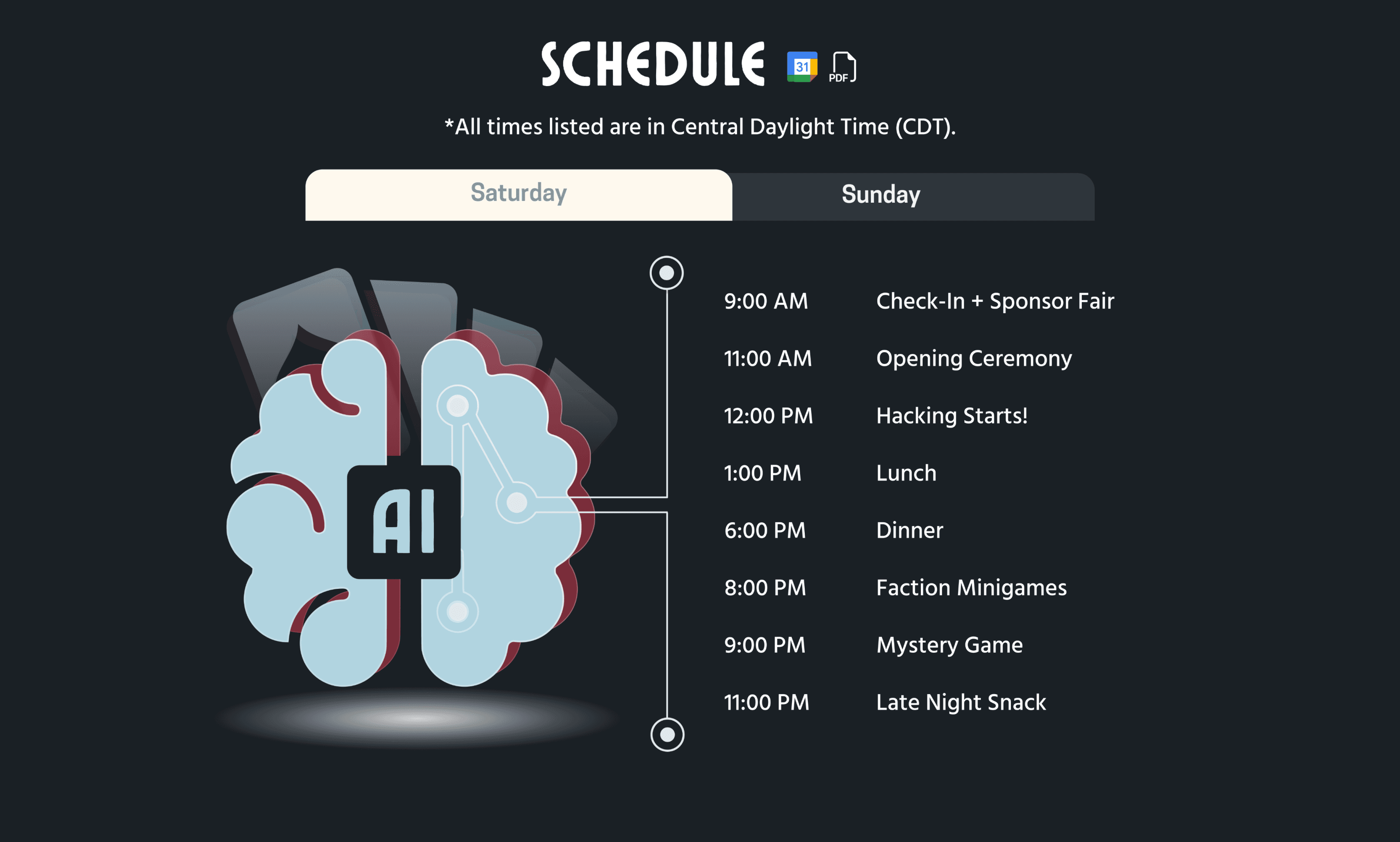
Key Features:

Auto-displays the current/relevant day without requiring clicks

Clear time markers and event categories for quick scanning

Export to calendar functionality for easy planning
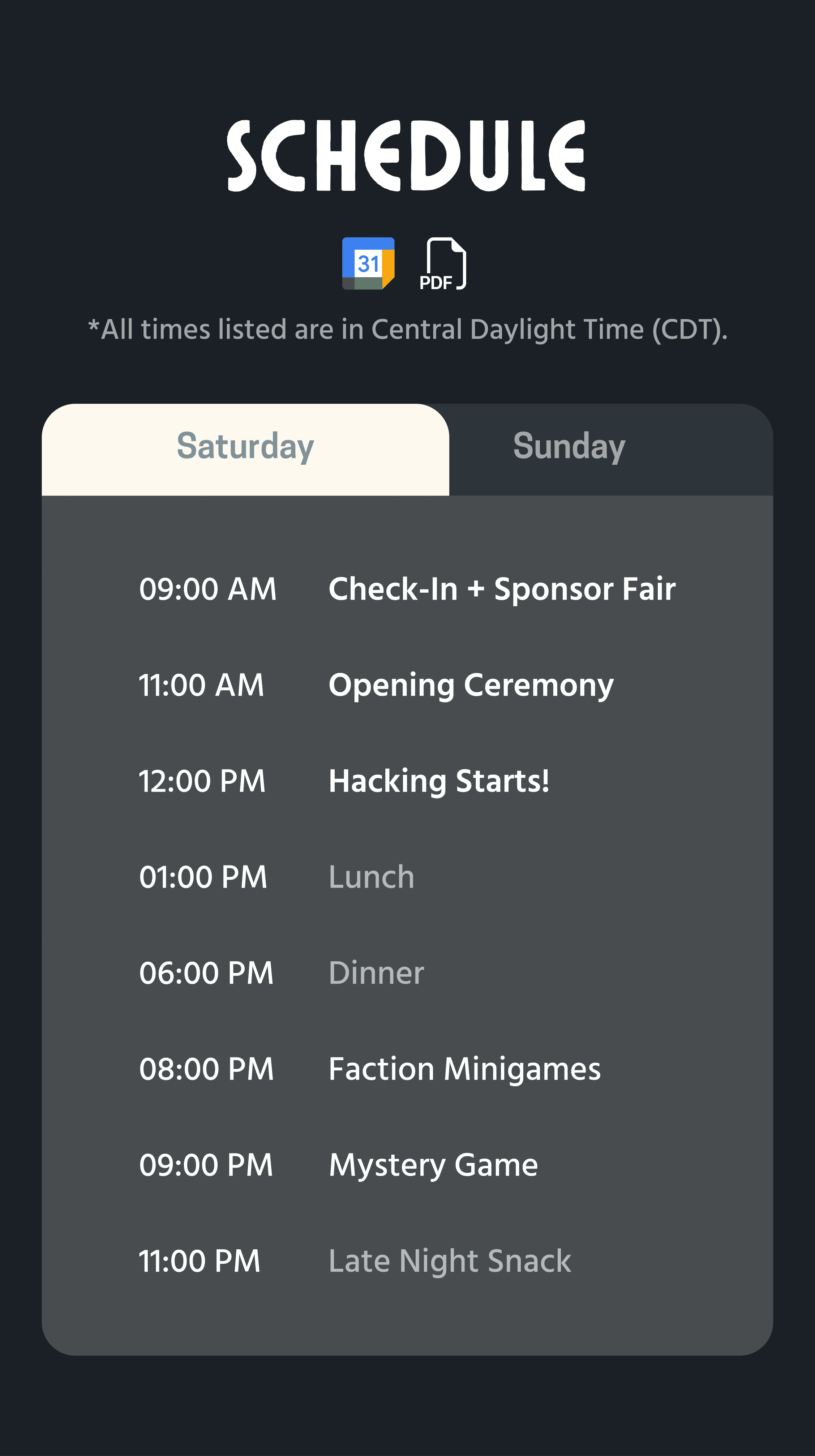
Mobile Experience

Single-column, thumb-friendly layout

Visual hierarchy: Major events in bold, meals in lighter weight

Design Decisions

Why This Works

→ Frictionless access: Research showed "frictionless registration increases signup." By auto-displaying the correct day and eliminating unnecessary clicks, we remove decision fatigue. Students see exactly what to expect without hunting.

→ Serves both personas: Emily (first-timer) gets the detailed timeline she needs to feel prepared. Jayden (veteran) can quickly scan times without reading paragraphs.

→ Mobile-first thinking: Students check schedules constantly during events—on their phones, not laptops. The mobile design prioritizes this behavior with quick-load times and one-thumb navigation.

Design Decisions

Why This Works

→ Frictionless access: Research showed "frictionless registration increases signup." By auto-displaying the correct day and eliminating unnecessary clicks, we remove decision fatigue. Students see exactly what to expect without hunting.

→ Serves both personas: Emily (first-timer) gets the detailed timeline she needs to feel prepared. Jayden (veteran) can quickly scan times without reading paragraphs.

→ Mobile-first thinking: Students check schedules constantly during events—on their phones, not laptops. The mobile design prioritizes this behavior with quick-load times and one-thumb navigation.

Design Decisions

Why This Works

→ Frictionless access: Research showed "frictionless registration increases signup." By auto-displaying the correct day and eliminating unnecessary clicks, we remove decision fatigue. Students see exactly what to expect without hunting.

→ Serves both personas: Emily (first-timer) gets the detailed timeline she needs to feel prepared. Jayden (veteran) can quickly scan times without reading paragraphs.

→ Mobile-first thinking: Students check schedules constantly during events—on their phones, not laptops. The mobile design prioritizes this behavior with quick-load times and one-thumb navigation.

results

results

results

The Site that Drives Real Engagement

The redesign didn't just look better—it performed better. From participation numbers to user satisfaction, every metric showed that the new design successfully solved the problems we identified in research.

< 10 sec

100% of test users found key info in under 10 seconds

4.8/5

Navigation satisfaction score from users

250+ participants

That's a 262% increase from the previous year

Design system

The redesign established a visual and functional foundation for future events

Real-World Impact

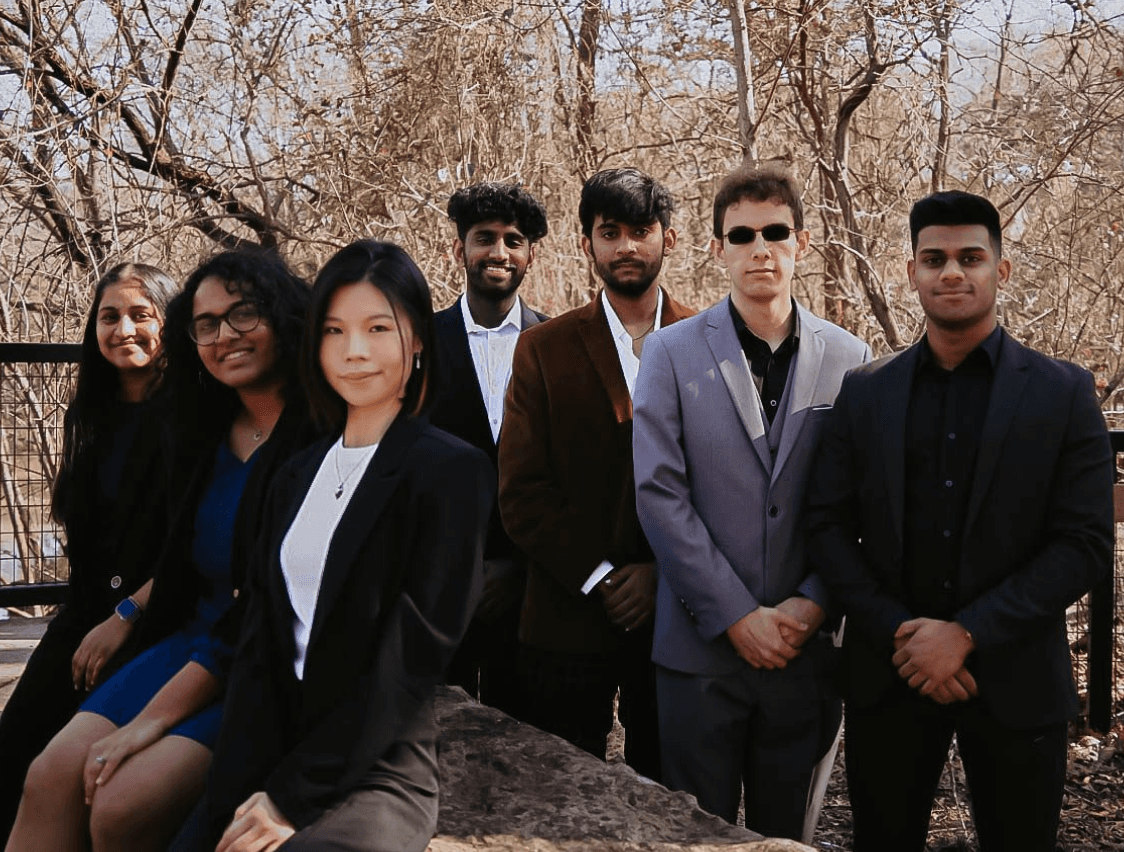
Big shoutout to the amazing team behind HackAI—couldn't have done it without you!
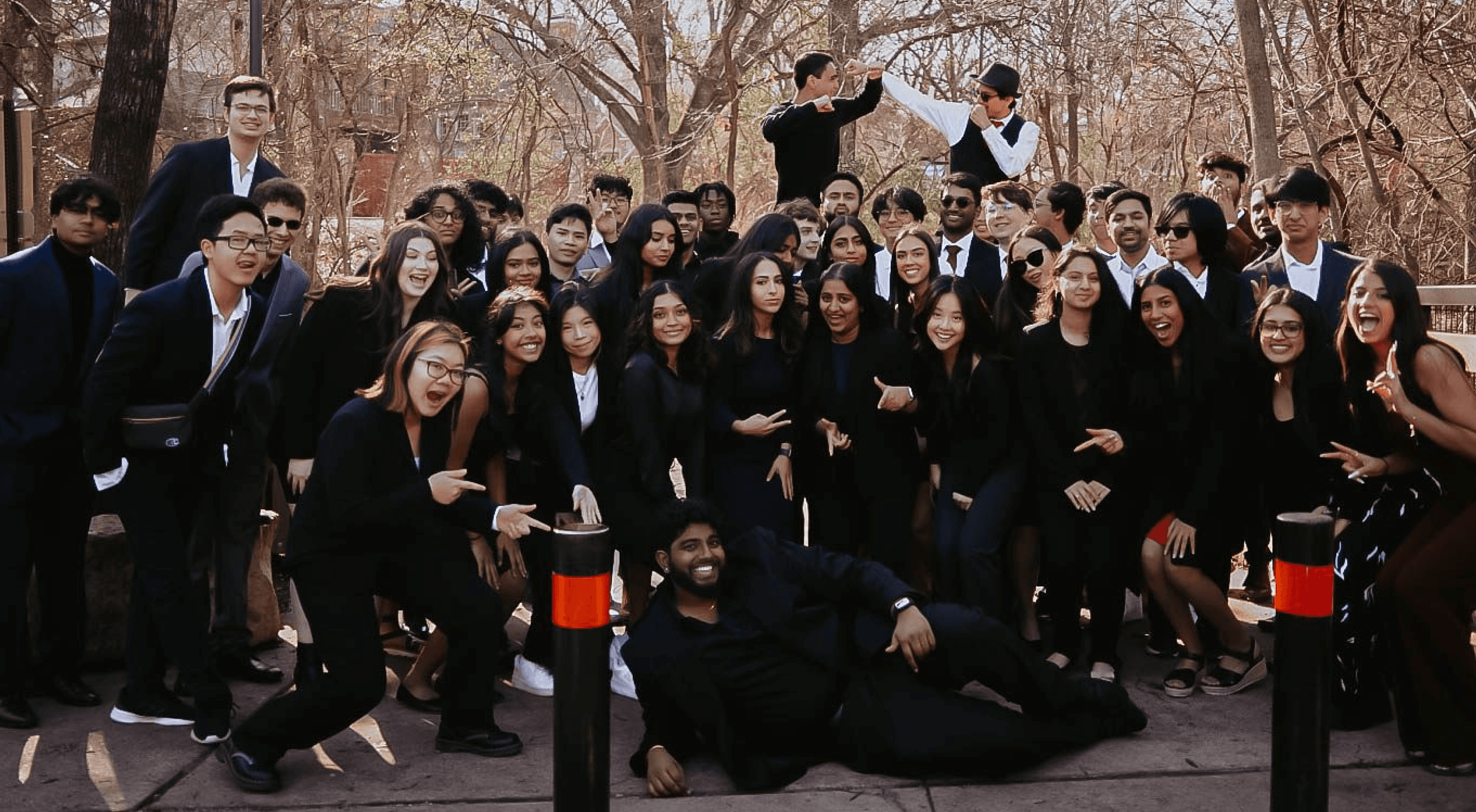
The Tech Team
By the Numbers
reflection

reflection

reflection

Reflections & Learnings

Challenges I Navigated

Tight Timeline

"We need the site live in 4 weeks for registration to open."

Solution: Focused on high-impact features first (hero, tracks, schedule, registration) and deprioritized nice-to-haves. Created a lightweight design system for faster handoff to developers.

Serving Two User Types

First-timers need encouragement; veterans need speed and efficiency.

Solution: Designed for progressive disclosure—surface-level info is instantly accessible (for Jayden), while detailed explanations are one click away (for Emily). Both personas get what they need without friction.

Bold Theme vs. Accessibility

Dark casino aesthetic could compromise readability and contrast.

Solution: Used high-contrast white text on dark backgrounds, tested color combinations for WCAG AA compliance, and ensured all interactive elements had clear focus states for keyboard navigation.

📚

What I Learned

This project pushed me to balance bold creative vision with real-world constraints—tight timelines, technical limitations, and diverse user needs. Here's what shaped my growth as a designer.

Collaborate with devs and organizers under real deadlines

Translate high-level goals into focused, user-first design

Balance theme, accessibility, and action

Next Steps

While the 2023 redesign successfully achieved its goals, there's room to evolve. Future improvements include adding dark/light mode toggle, refining mobile views across all sections, and building a modular design system that can scale across AIS's growing event portfolio.

Open to Chat!

Got feedback, ideas, or just want to connect?
I’m always up for a good conversation —

Let’s talk

Open to Chat!

Got feedback, ideas, or just want to connect?
I’m always up for a good conversation —

Let’s talk

Open to Chat!

Got feedback, ideas, or just want to connect?
I’m always up for a good conversation —

Let’s talk